
Reef
Blog
How to cool a reef tank without a chiller

Employing a fan system can significantly reduce water temperature in your aquatic environment. Positioning a high-speed fan to blow across the surface creates evaporation, which pulls heat away, effectively cooling the water. Aim for a fan that can adjust its speed to optimize airflow based on conditions.
Enhancing water movement is another practical approach. Utilizing powerheads or water pumps can promote circulation, distributing heat more evenly and preventing localized warming. Ensure that the equipment is placed strategically to maximize efficiency.
Regular water changes also contribute to temperature regulation. Replacing a portion of the water with cooler, treated water helps maintain a stable environment. Consider using a temperature-controlled water source to ensure consistency during changes.
Utilizing ice packs is a quick solution for immediate temperature drops. Place sealed bags of ice in the sump or directly in the water, monitoring closely to avoid rapid temperature shifts that could stress marine life.
Lastly, minimizing direct sunlight exposure is crucial. Positioning your setup away from windows or using reflective covers can significantly reduce heat gain from sunlight, contributing to a stable aquatic environment.
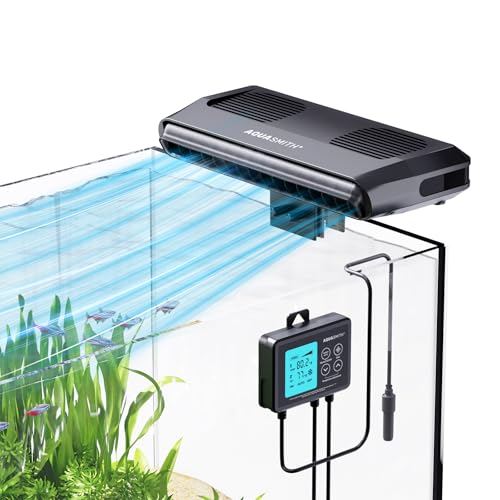

Strategies for Temperature Regulation in Aquatic Environments
Utilizing fans is an excellent method for reducing heat in aquatic habitats. Positioning a fan above the water surface increases evaporation, which helps lower the temperature. Ensure that the fan is directed at the water to maximize airflow and evaporation rates.
Reduce Lighting Duration
Minimizing the duration of lighting can significantly impact temperature levels. Consider decreasing the photoperiod, especially during the hottest months, to prevent excessive heat gain from lighting systems.
Increase Water Movement
Enhancing water circulation with powerheads or wave makers promotes even temperature distribution. Improved flow helps to dissipate heat and prevents hot spots from forming in the environment.
Regular water changes also aid in maintaining acceptable temperature levels. This practice not only refreshes the water but can also introduce cooler water, especially if you use treated tap water or water from a cooler source.
Utilizing Fans for Evaporative Cooling
Position fans strategically above the surface of the aquarium to enhance evaporation. This method draws moisture away from the water, leading to a decrease in temperature. Aim for a fan that can generate sufficient airflow, ideally between 200 to 400 CFM (cubic feet per minute).
Use multiple fans if necessary, ensuring they are adjustable to direct airflow effectively. Oscillating fans can also be beneficial, as they spread the airflow across a wider area, promoting uniform evaporation and preventing localized cooling.
Monitor humidity levels in the room. Excessive humidity can reduce the effectiveness of this method. A dehumidifier may be used if humidity levels exceed 60%. Maintain a balance to optimize the cooling process.
Consider the placement of the fans. Position them at a height that maximizes airflow over the water surface but minimizes disruption to the tank’s inhabitants. Avoid placing fans directly above coral or sensitive species.
| Fan Type | CFM Output | Pros | Cons |
|---|---|---|---|
| Oscillating Fan | 200-400 | Wide airflow coverage | May require more space |
| Clip-On Fan | 100-300 | Flexible positioning | Limited airflow range |
| Box Fan | 300-600 | High airflow | Bulky size |
Regularly check water parameters. Increased evaporation can lead to fluctuations in salinity. Top off the system with fresh water to maintain stability and prevent stress on aquatic life.
For optimal results, combine this method with other cooling techniques, such as increasing water movement or reducing lighting intensity during peak temperatures. This multi-faceted approach can significantly lower water temperatures effectively.
Adjusting Lighting to Reduce Heat Input
Reduce the intensity and duration of your lighting system. By shortening the photoperiod to 6-8 hours, you can significantly decrease the thermal load. Consider using programmable timers to automate this adjustment.
Switch to LED Fixtures
Opt for LED lighting, which generates less heat compared to traditional metal halide or fluorescent fixtures. LEDs are more energy-efficient and provide adequate illumination without excessive heat output. Look for fixtures with adjustable brightness to further tailor light levels to your needs.
Positioning and Reflectors
Ensure that lights are positioned higher above the water surface. This increases the distance heat must travel, reducing direct input into the water. Use reflective materials or lenses to maximize light distribution while minimizing heat focused on the aquarium. Adjusting the angle of the lights can also help disperse heat more effectively.
Strategic Placement of the Aquarium
Position the aquarium away from direct sunlight to minimize temperature fluctuations. Ideal locations are shaded areas or rooms with controlled lighting.
Consider the airflow in the space. Place the aquarium near open windows or in well-ventilated rooms to enhance air circulation.
Ensure that the aquarium is not located near heat sources, such as radiators or appliances, which can raise the water temperature.
Utilize reflective surfaces around the aquarium to redirect light and heat, keeping the environment cooler.
Evaluate the surrounding furniture and decor. Avoid heavy curtains or obstacles that block airflow around the aquarium.
Regularly monitor temperature variations in various locations before settling on a final placement. Use a thermometer to track changes.
Consider the height of the aquarium. Elevating it slightly can promote better air circulation underneath.
- Choose a location with consistent ambient temperature.
- Avoid enclosed spaces that trap heat.
- Regularly check for hot spots that could affect water temperature.